About Office Projectors
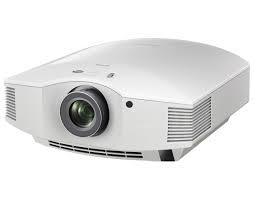
Since our establishment in the year 2011, we are dedicated towards manufacturing and supplying an extensive gamut of Office Projectors. These products are excellently designed under the firm direction of our skilled designers with the help of premium grade materials that are obtained from certified vendors of the market. Offered products are in huge demand in the market due to their easy installation. This range of products is available with us in different sizes and specifications at industry leading prices. Offered Office Projectors can be used in schools and offices for project display purpose.
Features:
- Perfect functioning
- Easy to operate
- High performance
Crisp Visuals for Every PresentationDeliver impressive presentations with this office projectors WXGA resolution (1280 x 800), 3500 lumens of brightness, and a sharp 2000:1 contrast ratio. Whether youre projecting detailed charts or rich visuals, every image appears clear. The 30-300 inch picture size ensures optimal viewing from small rooms to larger conference spaces.
Designed for Seamless ConnectivityThis projector offers flexible connectivity with HDMI, USB, VGA, AV, and audio interfaces. Effortlessly connect laptops, media players, or USB drives and enjoy instant playback of MP4, AVI, JPEG, TXT, and MP3 files. The built-in 5W speaker ensures clear audio, or connect external speakers via 3.5mm audio out for enhanced sound.
Reliable Performance and Simple OperationEnjoy uninterrupted operation with a durable LED lamp rated for 50,000 hours. Manual vertical keystone correction (15) and manual focus make setup straightforward. The inclusive remote control allows convenient access to all functions, whether youre onsite or presenting from afar.
FAQs of Office Projectors:
Q: How do I connect my laptop or media device to the projector?
A: You can connect your laptop or media device using the HDMI, VGA, or USB input ports. Simply select the appropriate source on the projector and ensure your device is outputting to the connected port.
Q: What file formats are supported for direct playback via USB?
A: The projector supports direct playback of MP4, AVI, MPEG, JPEG, TXT, and MP3 files when plugged in via USB. This provides flexibility for multimedia presentations without needing a computer.
Q: Where is this projector suitable for use?
A: This projector is ideal for offices, conference rooms, training centers, and classroom environments. Its portable design and broad compatibility with PAL, NTSC, and SECAM systems make it suitable for diverse professional settings across India and globally.
Q: What benefit does the LED lamp provide compared to traditional bulbs?
A: The LED lamp offers a lifespan of up to 50,000 hours, ensuring long-term reliability and low maintenance. It also consumes less energy and maintains brightness longer than traditional lamps.
Q: When should I use the manual keystone correction feature?
A: Manual vertical keystone correction (15) should be used when the projected image appears distorted due to the projectors angle. Adjusting this function will align and straighten the image for an optimal viewing experience.
Q: What is the typical process to set up the projector for a training session?
A: Place the projector between 1.2m and 5.5m from the screen, connect your video source via one of the input interfaces, power on the unit, and use the manual focus and keystone controls to adjust the image. Content can be presented either from connected devices or directly from USB storage.





 : +919825071761


 Send Inquiry


 Send Inquiry


 Send Inquiry
 Send SMS